There's a right way and a wrong way to bass boost a song. The wrong way — just yanking the low EQ up — makes the track boomy, muddy, and distorted, and it clips the second the bass hits. The right way adds real weight and warmth without any of that. This guide shows you the right way, and lets you do it free in your browser.
What does "bass boosting" actually do?
Bass boosting increases the energy in the low frequencies of a song — the sub-bass and kick-drum region you feel as much as hear. Done well, it makes a track feel bigger, fuller, and more powerful, especially on headphones, car systems, and subwoofers.
The problem with naive bass boosting is two-fold:
- It muds up the mix if you boost too wide a range, smearing the low-mids where vocals and instruments live.
- It clips — boosting adds energy, and if the track was already loud, the peaks distort.
A good bass booster solves both. Here's how.
Two kinds of "more bass": Boost vs. Drive
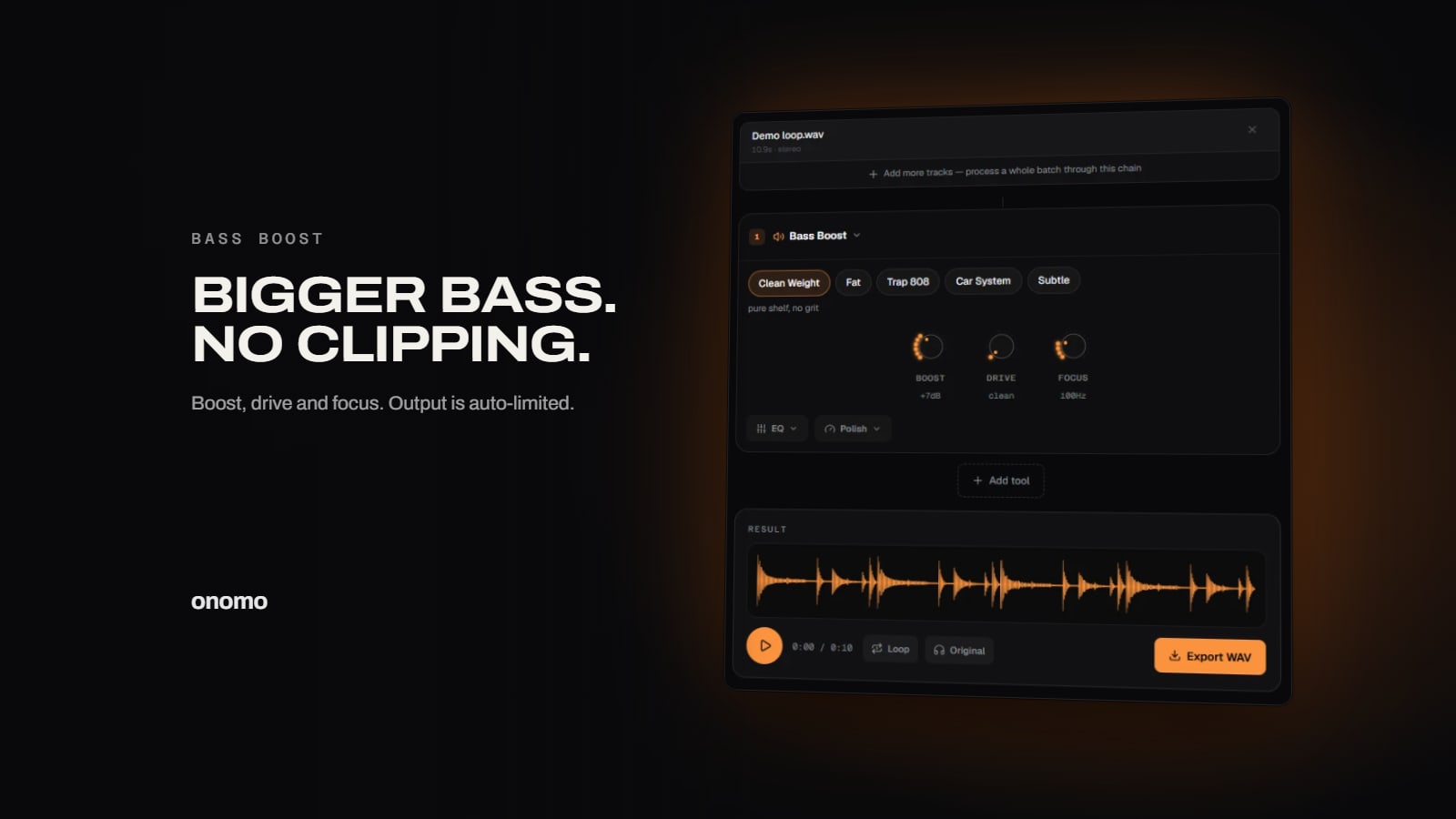
The Bass Boost tool gives you two different ways to add low end, and understanding the difference is the key to a pro result:
- Boost is a clean low-shelf — it lifts the low frequencies evenly for pure size and weight. This is "more of the bass that's already there."
- Drive saturates the sub-band — it adds harmonic richness, the fat, slightly-distorted-in-a-good-way warmth that a plain EQ can't give. This is the analog "thickness" that makes bass feel powerful even on small speakers.
The magic is usually a combination: some Boost for size, a touch of Drive for warmth.
How to bass boost a song, step by step
1. Load your track
Open the Bass Boost tool and drop in your file (MP3 or WAV). It processes locally — nothing uploaded.
2. Add Boost for size
Bring up Boost until the low end feels full and weighty. Don't go straight to max — push it until it feels powerful, then back off slightly so the rest of the song still breathes.
3. Add Drive for warmth
Add a little Drive to saturate the sub-band. This is what gives the bass that rich, fat, "expensive" quality. A small amount goes a long way — too much turns into obvious distortion.
4. Tune the focus frequency
Every song's bass sits in a slightly different place. Adjust the focus frequency so the boost lands on your track's bass rather than the low-mids:
- Lower focus — targets deep sub-bass (good for 808s and electronic music).
- Higher focus — targets the punch and body of the kick and bass guitar.
Sweep it until the boost feels like it's hitting the part of the bass you want bigger, not muddying the vocals.
5. Export
When the low end hits right, export your bass-boosted track.
Tips for a clean, powerful bass boost
- Boost narrow, not wide. Keeping the boost focused on the true bass region avoids the mud that comes from lifting the low-mids.
- Drive is seasoning, not a main course. A touch adds warmth; too much sounds broken.
- Check it on multiple speakers. Bass that sounds huge on headphones can be overwhelming in a car. Aim for "full" on big systems, not "blown out."
- Let the limiter do its job. Because output is auto-limited, you can push for feel without watching for clipping — but if it starts sounding squashed, ease off the Boost.
FAQ
Is the bass boost tool free? Yes — free, in your browser, nothing uploaded. No account needed.
Will bass boosting distort or clip my song? Not with this tool — the output is auto-limited so it never clips. (Adding Drive intentionally adds warm saturation, which is different from accidental clipping.)
What's the difference between Boost and Drive? Boost is a clean low-shelf EQ for size. Drive saturates the sub-band for harmonic warmth and thickness. Use Boost for "more bass," Drive for "fatter bass."
Will my song be uploaded anywhere? No — all processing is local to your device.
Can I bass boost a song on my phone? Yes, it works in a mobile browser.
Bass boost a song now
Open the Bass Boost tool, drop in a track, add Boost for weight and a touch of Drive for warmth, tune the focus to your bass, and export. Big, clean low end — no mud, no clipping.
Ready to try it yourself?
Onomo is a creative suite in your browser — a full DAW, a design editor, a video editor and a writing room. Free to start, nothing to install.
Open the Bass Boost tool